

The best AI tool for a faceless YouTube channel depends on which part of the video you’re trying to improve.
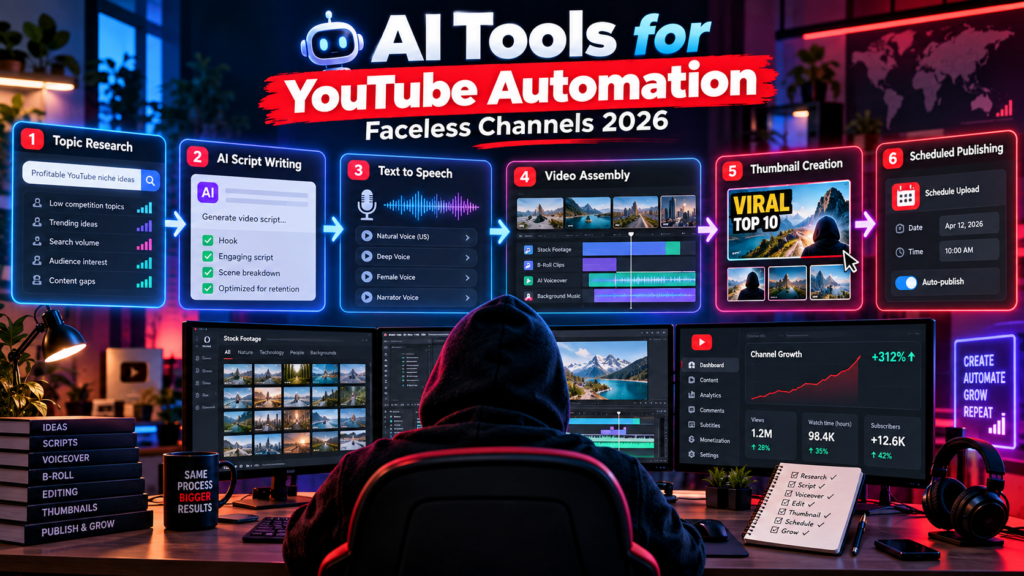
ChatGPT can help research and structure a script. ElevenLabs can handle AI narration. Video tools can generate or assemble visuals. Editing tools can speed up production. Canva can help with thumbnails.
The mistake is assuming one AI tool should automate the entire channel.
A better approach is to build a workflow where each tool has a specific job and you remain responsible for the idea, accuracy, pacing, editing, and final video.
Quick answer: For a practical faceless YouTube workflow, use an AI assistant such as ChatGPT for research and scripting, ElevenLabs when you need AI narration, a video creation or editing tool such as InVideo, Pictory, Pollo AI, CapCut, or Runway depending on the project, and Canva or another design tool for thumbnails.
Disclosure: This article may contain affiliate links. If you purchase through one of them, I may earn a commission at no extra cost to you. Affiliate relationships do not determine which tools are included or what I say about them.
Browse the TechnofluxAI Ultimate AI Tools Directory →
What Is a Faceless YouTube Channel?
A faceless YouTube channel publishes videos without making the creator’s face the center of the content.
That doesn’t automatically mean the channel is AI-generated.
Faceless videos can use narration, screen recordings, animation, stock footage, original graphics, product footage, charts, AI-generated media, or combinations of several formats.
Research, hooks, structure, narration, and fact checking.
Your own narration or an appropriately licensed AI voice.
Original footage, stock media, screen recordings, graphics, or generated media.
Pacing, captions, cuts, music, effects, and final quality control.
AI can help with all four stages, but using AI doesn’t remove the need for a creator.
That’s especially important if monetization is the goal. YouTube’s monetization policies emphasize original, authentic content and can reject channels built around mass-produced, repetitive, or minimally changed template content.
The goal isn’t maximum automation. The goal is to remove repetitive production work without removing the originality that gives somebody a reason to watch your video.
Best AI Tools for Faceless YouTube Channels
Instead of pretending there’s one “best” tool for everything, it makes more sense to choose tools by job.
You don’t need all of them. In fact, using fewer tools well is usually easier than constantly moving a project between five different AI platforms.
1. ChatGPT: Research, Ideas, and Script Development
ChatGPT makes the most sense near the beginning of the workflow.
You can use it to brainstorm video ideas, research questions to investigate, organize notes, create outlines, develop hooks, draft narration, or rewrite a section that isn’t working.
- Turning research notes into an outline.
- Generating several hook ideas.
- Finding weak sections in a script.
- Changing the pacing or tone of narration.
- Generating questions that still need research.
The weak approach is asking for “a 10-minute viral YouTube script” and publishing whatever comes back.
That makes it easy to produce the same generic structure everybody else can generate.
Better workflow: Bring your research, examples, argument, test results, story, or angle into the AI conversation first. Let AI help structure something you actually have to say.
2. ElevenLabs: AI Voiceovers
If you don’t want to record your own narration, ElevenLabs is designed around AI-generated speech and voice technology.
For a faceless channel, that can make it useful for narration and multilingual audio workflows.
The important part isn’t simply making a voice sound realistic. The narration still needs pacing, pauses, pronunciation, emphasis, and a script that sounds natural when spoken aloud.
Don’t skip the listening test: Generate the narration, put your headphones on, and listen to the entire thing. Sentences that look fine on a screen can sound awkward once they’re spoken.
If you’re cloning or recreating a person’s voice, make sure you have the necessary rights and consent.
3. InVideo: Building a Video Draft From an Idea
InVideo is useful when you want AI assistance moving from an idea or script toward an assembled video.
That can reduce the amount of manual production required for an initial draft, especially when a video relies on narration, supporting visuals, captions, and conventional edits.
But an automatically assembled first version should be treated as a draft.
Watch for repeated stock footage, visuals that don’t match the narration, awkward cuts, generic pacing, and scenes that feel interchangeable with hundreds of other AI-generated videos.
4. Pictory: Script-to-Video Production
Pictory is another option for converting written material into video content and assembling elements such as visuals, narration, and captions.
This type of tool can be useful when your starting point is already a script, article, or other piece of written content.
Where human editing matters: AI can match a sentence with a technically relevant visual and still choose something boring. Relevance and watchability aren’t the same thing.
5. Pollo AI: Generating Video Clips
Pollo AI fits a different part of the workflow. Rather than relying only on existing footage, AI video generation can create clips from prompts or source images.
That can be useful when the exact visual you need doesn’t exist in stock libraries or when you’re intentionally creating a stylized sequence.
Generated video still needs review. Look for continuity problems, strange movement, inaccurate details, distorted text, inconsistent characters, and anything that could mislead the viewer.
Affiliate option: If Pollo AI fits your production workflow, you can explore Pollo AI here →
6. Runway: Generative Video and Visual Effects
Runway is more interesting when the visual itself is part of what you’re creating rather than something you simply need to assemble.
It can fit projects involving generated scenes, visual transformations, effects, and other AI-assisted video work.
For a basic narration-over-stock-footage channel, that may be more than you need. For a channel where distinctive visuals are part of the appeal, generative video tools become much more relevant.
7. Canva: Thumbnails and Channel Graphics
A video isn’t finished when the edit is exported.
You still need to convince someone to click it.
Canva can handle thumbnail layouts, typography, background removal, image editing, reusable brand elements, and other channel graphics without requiring advanced design software.
AI features can speed up parts of that process, but thumbnail judgment still belongs to you.
A useful thumbnail question: If someone sees this for one second on a phone, can they immediately understand the subject and why they might care?
A Practical AI Workflow for a Faceless YouTube Video
You don’t need to automate every step. Give each tool a job and keep a human checkpoint between the important stages.
Start with a question, story, experiment, problem, or angle worth making a video about.
Collect reliable sources, examples, screenshots, data, or firsthand information. AI can help organize the research, but don’t treat generated claims as evidence.
Use ChatGPT or another AI assistant to structure and improve the material rather than replacing the material.
Record your own voice or use an AI voice tool where appropriate.
Combine original footage, screenshots, screen recordings, licensed stock media, graphics, or generated video according to the project.
Remove repetition, tighten slow sections, verify visual accuracy, and make sure the first part of the video earns the viewer’s attention.
Create the title and thumbnail after you know exactly what promise the finished video delivers.
One Thing I have Learned while building TechnofluxAi is that Ai tools usually sound easier to use than they are in the real world. I like to try things myself, see where I get stuck, and figure out what actually saves time instead of just repeating promisies.That’s the approach I use throughout this site: keep what works, point out what doesn’t, and explain things in a way that makes sense for someone who is still learning. I started out searching for an image creator. That was my first interaction with Ai. I was frustrated by the vast tool list without any real direction on which tool was best. Then I realized how powerful this tool was .and was going to be in the future. Making mistakes has helped me in the choice of articles I write.
AI Automation Doesn’t Mean Automatic Monetization
This is the part that gets lost in a lot of faceless YouTube advice.
Being able to produce a video quickly doesn’t mean the video is good, and being able to generate dozens of videos doesn’t mean YouTube will monetize them.
YouTube’s monetization policies focus on whether content is original and authentic. Mass-produced or repetitive content built from templates with little meaningful variation can be ineligible for monetization.
That’s why I wouldn’t build a channel around this idea:
Prompt → AI script → AI voice → automatic stock footage → upload → repeat 100 times.
The production system may work technically. The bigger question is why anybody would choose to watch video number 47 when it feels exactly like the other 46.
What AI Should Automate
- First-draft outlines
- Transcript cleanup
- Caption assistance
- Repetitive editing tasks
- Idea variations
- Asset organization
- Topic selection
- Fact checking
- Original angle
- Story and pacing
- Final visual decisions
- Publish or delete decision
AI is most useful when it removes tedious work while leaving the decisions that make the video distinctive in your hands.
Do You Need to Disclose AI-Generated Content?
Sometimes.
YouTube requires creators to disclose meaningfully altered or synthetically generated content when it appears realistic and could cause viewers to believe a real person, place, scene, or event is authentic when it isn’t.
That can include making a real person appear to say or do something they didn’t, altering footage of a real event or place, or generating a realistic scene that never happened.
Important: YouTube says disclosing altered or synthetic content does not by itself limit a video’s audience or its eligibility to earn money.
If you’re using AI to create realistic media, check YouTube’s current disclosure requirements before publishing rather than assuming every AI use is treated the same way.
The Biggest Mistakes to Avoid
A polished voiceover doesn’t make an invented statistic or incorrect claim true.
Automation gets faster when everything looks identical. Unfortunately, it can also make the channel forgettable.
Don’t start with “I bought an AI video generator, what can I upload?” Start with something worth watching and choose the tools afterward.
Publishing more videos gives you more attempts. It doesn’t guarantee viewers will click, watch, return, or subscribe.
How Faceless YouTube Channels Can Make Money
A faceless channel can use many of the same business models as any other YouTube channel.
- YouTube advertising: For channels accepted into the YouTube Partner Program and eligible for the applicable monetization features.
- Affiliate marketing: Recommending relevant products or services with proper disclosure.
- Sponsorships: Working with companies once the channel has an audience they want to reach.
- Digital products: Selling templates, guides, courses, downloads, or other useful resources.
- Services: Using the channel to attract clients for work related to the subject.
None of these automatically becomes passive income just because AI was involved in making the video.
Frequently Asked Questions
What are the best AI tools for faceless YouTube channels?
It depends on the task. ChatGPT can help with research and scripts, ElevenLabs with AI narration, tools such as InVideo or Pictory with video assembly, generative video tools such as Pollo AI or Runway with custom visuals, and Canva with thumbnails and graphics.
Can you monetize a faceless YouTube channel?
A faceless channel can qualify for YouTube monetization if it meets the program’s current requirements and policies. Being faceless isn’t the issue. Originality, authenticity, rights, policy compliance, and the nature of the content matter.
Does YouTube allow AI-generated videos?
YouTube allows creators to use AI tools, but its other policies still apply. Monetized content must meet its originality and authenticity requirements, and certain realistic altered or synthetic media must be disclosed.
Can AI automate an entire YouTube channel?
AI can automate or accelerate many production tasks, but automating every creative decision can lead to repetitive, inaccurate, or generic content. A stronger workflow uses AI for production assistance while keeping human control over the idea, research, quality, and final edit.
Do I need an AI voice for a faceless channel?
No. Faceless only means you don’t need to appear on camera. You can still use your own voice, hire a narrator, use text-based formats, or use an AI voice where appropriate.
Should beginners use one AI tool or several?
Start with the smallest tool stack that solves your production problem. A complicated workflow with six subscriptions isn’t automatically better than a simple workflow you understand and can repeat consistently.
Use AI to Make the Work Easier, Not the Content Generic
That’s the distinction I think matters most with faceless YouTube.
AI can remove a lot of friction from scripting, narration, editing, visual creation, and repetitive production work.
But if everyone has access to the same tools, the tool itself isn’t much of an advantage.
The advantage is what you put into the system.
Better ideas. Better research. Better hooks. Original examples. Stronger editing. Useful information. And knowing when the AI-generated version isn’t good enough to publish.
That’s a much more durable strategy than trying to automate a hundred generic videos before somebody else does.

About the Author
Jon Hicks
Founder of TechnofluxAI.
I’m the creator behind TechnofluxAI, focused on breaking down powerful AI tools, emerging trends, and practical strategies to help creators and entrepreneurs stay ahead in a rapidly evolving digital world.
Follow TechnofluxAI for the latest AI tools & strategies