
AI Study Tools
5 Best AI Flashcard Apps for Students in 2026
Creating flashcards manually can help you process information, but it can also consume the time you planned to spend studying. AI flashcard apps offer a middle path: import existing material, generate a first draft, correct it, and move into active recall sooner.
Affiliate disclosure
TechnofluxAI may earn a commission if you purchase through links on this page, at no additional cost to you.
Best Overall Import Workflow
Gizmo AI — best for turning varied study material into flashcards and quizzes.
Best Established Ecosystem
Quizlet — best for shared sets, familiar study modes, and broad AI study tools.
Best Advanced SRS
Anki — best for students who want deep spaced-repetition control.
Quick Answer
- Best for turning varied study material into flashcards: Gizmo AI
- Best established flashcard ecosystem: Quizlet
- Best for advanced spaced repetition: Anki
- Best free-oriented AI study toolkit: Knowt
- Best for notes, PDFs, and flashcards in one workspace: RemNote
The main problem is not finding an app that can generate cards. The real problem is choosing a tool that fits your actual study material. PDFs, slides, lecture recordings, YouTube lessons, class-shared sets, and long-term memorization all create different needs.
This guide compares five AI flashcard apps by workflow, imports, active recall, spaced repetition, exam prep, free access, and realistic student use cases.
How We Chose the Best AI Flashcard Apps
We compared currently published product capabilities rather than inventing a fake numerical score. The goal is to help students choose the best workflow, not crown a generic winner.
Reality Check
AI output is not automatically accurate. Whichever tool you choose, compare generated cards with the original lecture, document, textbook, or instructor guidance before trusting them.
1. Gizmo AI — Best for Turning Study Material Into Flashcards
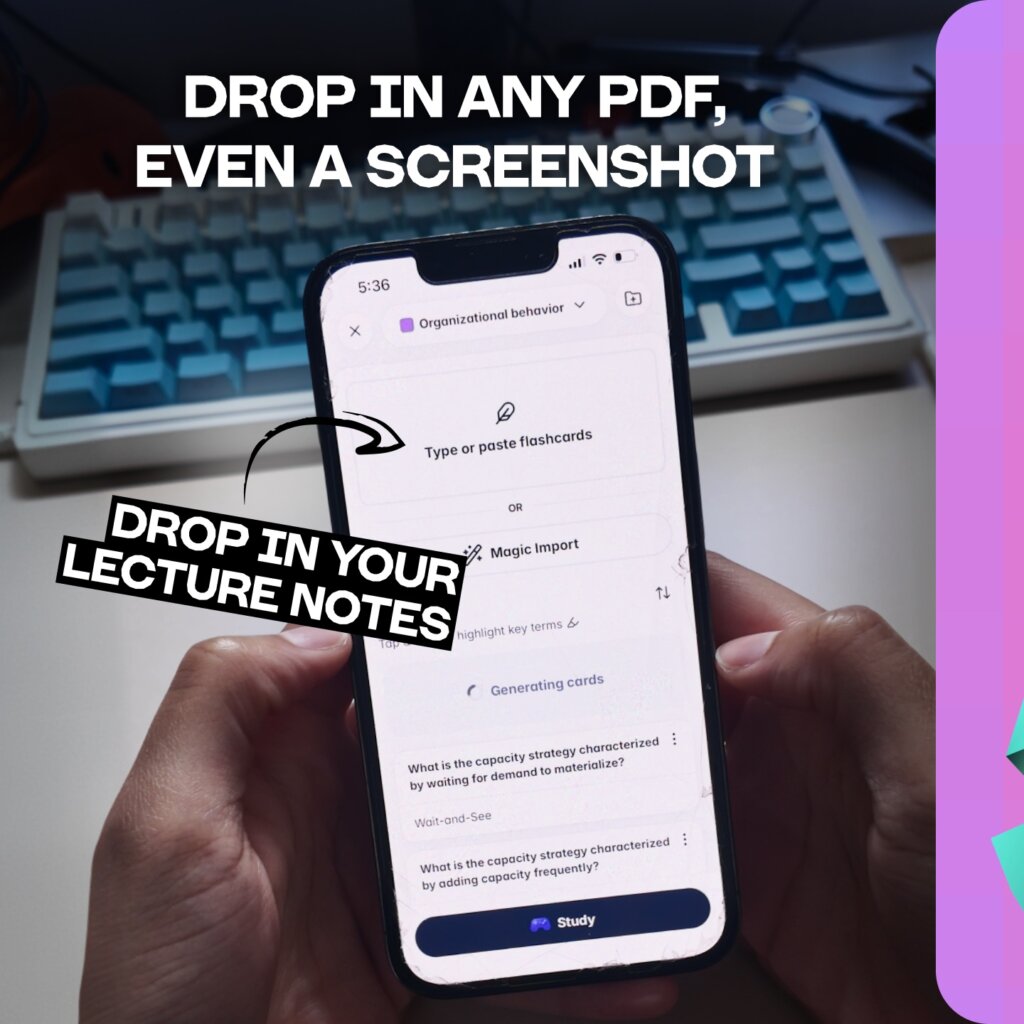
Gizmo is a student-focused app that combines AI-generated flashcards, quizzes, spaced repetition, progress tracking, and an AI Tutor. Its main advantage is Magic Import, which is designed to turn different kinds of study material into cards and lessons.

Best for
- College students with mixed lecture formats
- Students who want to reduce manual card creation
- Learners motivated by XP, levels, leagues, or streaks
- Exam preparation built around frequent short quizzes
Why it stands out
Current Gizmo documentation says Magic Import can work with PDFs, PowerPoint presentations, pasted notes, YouTube links, photos, recordings, Quizlet sets, and existing Gizmo decks. After import, students can use Memorise mode for active-recall questions and spaced review.
Pros
- Broad selection of import sources
- Clear import-to-quiz workflow
- Spaced repetition and active recall
- AI explanations connected to imported material
Cons
- Generated cards require review
- Subscription prices and limits can change
- Gamification may not appeal to everyone
2. Quizlet — Best for a Large Flashcard Ecosystem
Quizlet combines a long-established library of shared study sets with newer AI tools. Its AI flashcard generator can work from typed notes, PDFs, lecture slides, connected documents, and supported handwritten-note input. Quizlet also promotes AI study guides, practice tests, PDF summaries, Smart Assist, and multiple study modes.
Best for
- Students who use public or class-created sets
- Teachers and classes that already share Quizlet material
- Learners who want flashcards, guides, and practice tests together
Watch out for
Public study sets can contain mistakes. AI-generated sets can also need editing. Quizlet is strongest when students verify the material instead of assuming every shared or generated card is correct.
Why students choose Quizlet
Quizlet is helpful when you want more than a card deck. Its AI tools can turn raw material into flashcards, study guides, practice tests, summaries, and other review resources.
3. Anki — Best for Advanced Spaced Repetition
Anki is a powerful flashcard program that prioritizes difficult material and schedules reviews over time. It offers deep control over cards, decks, media, and scheduling.
The Anki difference
Anki is not mainly an AI flashcard generator in the same way as the other tools in this roundup. Students often create cards manually or use separate tools and community add-ons. That extra setup can be worth it for medical school, language learning, certifications, and high-volume long-term memorization.
Pros
- Powerful review scheduling
- Highly customizable cards
- Desktop application supports offline study
- Large community and add-on ecosystem
Cons
- Steeper learning curve
- AI generation is not the main native workflow
- Setup and card design can require more time
4. Knowt — Best Free-Oriented AI Study Toolkit
Knowt promotes an AI flashcard generator that can create cards from notes, PDFs, PowerPoints, videos, lecture material, and other sources. It also offers study modes such as Learn, practice tests, and spaced repetition.
Best for
- Budget-conscious students
- Learners importing PDFs and presentations
- Students looking for multiple review modes
Watch out for
“Free” features and usage allowances can change. Before moving an entire course into Knowt, check the current plan screen and test whether the limits work for your workload.
5. RemNote — Best for Notes, PDFs, and Flashcards in One Workspace
RemNote combines note-taking, PDF annotation, flashcards, spaced repetition, quizzes, and AI tools in one workspace. Its current AI flashcard pages describe workflows for generating flashcards from PDFs, uploaded documents, and lecture recordings, with generated content connected to notes and spaced repetition.
Best for
- Students building a connected knowledge base
- Learners who annotate PDFs while taking notes
- Users who want source material and cards in one system
Watch out for
RemNote is more complex than a simple flashcard app. Some PDF and AI workflows may involve paid features, usage limits, or AI credits, so verify current plan details before depending on it for every class.
Best AI Flashcard App for College Students
There is no universal winner, but the use cases are clear. Choose the app that removes your actual study bottleneck instead of chasing the app with the longest feature list.
Choose Gizmo
Your course material arrives as PDFs, slides, notes, photos, recordings, and videos, and you want a direct path into quizzes.
Choose Quizlet
Your class already shares sets, or you value its library, familiar study modes, and broader AI study tools.
Choose Anki
Long-term scheduling control matters more than automated card creation.
Choose Knowt
You want to explore a free-oriented AI study toolkit before committing to a paid app.
Choose RemNote
Flashcards need to remain connected to detailed notes and PDF annotations.
Best AI Flashcard App for Lecture Notes
Gizmo is a strong option for lecture notes because it accepts pasted notes, PowerPoint files, PDFs, photos, YouTube links, and lecture recordings. That flexibility can reduce the number of conversion steps between class and review.
Quizlet is another good choice for typed notes, slides, PDFs, connected documents, and supported handwritten-note input. RemNote is better suited to students who want to annotate the source and build connected notes while creating cards.
Best AI Flashcard App for Exam Prep
For short-term exam preparation, focus on speed and practice quality. Gizmo, Quizlet, Knowt, and RemNote can all shorten the trip from source material to questions.
For cumulative subjects studied across months or years, Anki’s mature spaced-repetition controls deserve attention.
Exam Prep Warning
No app should be the entire exam plan. Add realistic practice problems, timed essays, sample tests, diagrams, verbal explanations, or lab work as required by the course.
Best Free AI Flashcard Option
Knowt currently promotes free flashcard creation and several free study modes. Gizmo and Quizlet also provide free access with limits or paid upgrades available.
Free-plan terms change frequently. Before committing, test whether the current allowance covers your document size, number of imports, AI generations, and preferred study modes.
AI Flashcards vs Traditional Flashcards
AI flashcards save setup time, but manual creation can itself improve learning. The strongest approach combines both methods.
Best Hybrid Workflow
- Use AI to generate a first draft.
- Compare every answer with the source.
- Rewrite complicated cards in your own words.
- Keep one clear question or idea per card.
- Add examples that require understanding, not just recognition.
- Review over several days.
Common Mistakes to Avoid
Importing Everything
A huge unedited deck can become a second workload. Smaller accurate decks are usually easier to review.
Skipping Verification
Generated cards can miss context, misread source material, or turn minor details into major questions.
Using Flashcards for Everything
Flashcards are great for recall, but they are not enough for every subject or assignment type.
Which AI Flashcard App Should You Choose?
Choose the app that removes your actual bottleneck.
- Choose Gizmo if you want to transform mixed course material into quizzes quickly and value a guided, gamified review loop.
- Choose Quizlet if you want shared sets, broad AI study tools, and a familiar ecosystem.
- Choose Anki if you want advanced control over long-term review and are willing to spend more time setting it up.
- Choose Knowt if budget is central and its current free tools cover your needs.
- Choose RemNote if you want notes, documents, flashcards, and spaced repetition in one connected workspace.
Start With One Lecture
Compare the generated cards with the source, complete a short study session, and choose the tool you are most likely to use consistently.
See Gizmo AI →Frequently Asked Questions
What is the best AI flashcard app?
Gizmo is a strong choice for importing varied study material, Quizlet for its broad ecosystem, Anki for advanced spaced repetition, Knowt for free-oriented AI tools, and RemNote for integrated notes.
Can AI make flashcards from lecture notes?
Yes. Several apps can generate flashcards from pasted notes. Some also accept slides, PDFs, photos, recordings, and videos.
Can AI make flashcards from PDFs?
Yes. Gizmo, Quizlet, Knowt, and RemNote currently provide PDF-based study workflows.
Are AI flashcards good for studying?
They can save preparation time and support active recall, but students must check them for errors, missing context, and weak questions.
Is Gizmo better than Quizlet?
Gizmo is compelling for a streamlined import-to-quiz workflow. Quizlet is compelling for its established content library and wider range of study resources.
Which flashcard app uses spaced repetition?
Gizmo, Anki, Knowt, and RemNote explicitly offer spaced-repetition workflows. Implementation and scheduling controls differ by app.
Want more TechnofluxAI in Google?
Add TechnofluxAI as a Preferred Source to help Google show you more of our AI guides, tests, workflows, and research.